


What is linearization and what do you need it for? In this article, we like to introduce you to this process and discuss our matching module, the Linearization Assistant. Basically, linearization allows you to consistently reproduce a specific combination of media and ink on a printing system.
Linearization is also a prerequisite for the Profiler, which you can use to generate an output profile as a basis for further print jobs under the same printing conditions. In doing so, it covers two tasks:
- It is a type of calibration in which a linear relationship is established between printer input and printer output (print data and print image). The individual CMYK printing colors are printed linearly from 0-100% on the medium.
- Matched to printer model, medium, ink and print mode, the full color laydown (full color) for each individual print color CMYK is set so that the printer can convert it well.
You always linearize for a specific printer model with a specific MIM combination (medium, ink, print mode). However, if you change the medium, ink, or print mode, you must perform the linearization again. Here is an example of a linearization measurement:
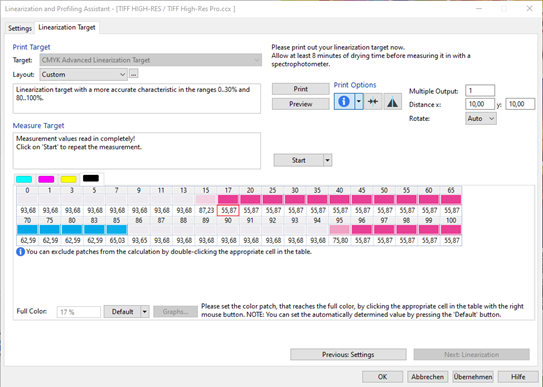
With ColorGATE Productionserver, you now achieve a further refined linearization. You receive a file that contains evenly graded tonal values of the various primary colors from 0 to 100 percent.
You can then create a so-called ICC color profile – this is also called “characterization” of the printing system. Here, the color properties of the printing system are measured and “mapped”.
As a result, you receive a kind of translation table: this shows ColorGATE Productionserver how the system must be controlled in order to produce certain color tones in printing.
Linearization Assistant
Now this is where ColorGATE’s Linearization Assistant comes into play, providing the basis for your color management. So to ensure that you can print consistent colors, you need to have control over your color laydown.
Using the Linearization Assistant, you calculate the optimal characteristic print curve to achieve a linear print (if you want to print at 60% density, you actually do so) and thus a consistent color laydown. Then print and measure a linearization target to determine the actual ink coverage. You will need this to get 100% color density for each color channel.
With this you achieve:
- The printing of smooth color gradients
- Matching color application and actual color impression
- Calibrating your printer for consistent color output
You can find more information about linearization in the article „Calibration clarified“.
We wish you joyful printing!